
Choosing the Best Photo Book Album Design Software for Your Printing Business
Scroll through any set of customer analytics and you’ll see it – projects abandoned halfway through. The reason is rarely a lack of interest, but rather friction in the creation process. When software is too slow, too complex, or overwhelming, customers who just wanted to create a beautiful photo album will simply give up.
The right photo book album design software solves this by making the creation process fast and frictionless. It’s not about dazzling people with endless options, but about helping them get from a folder of photos to a “ready to order” product with minimal effort. In a competitive market, that kind of efficiency is a powerful revenue lever. This guide will walk you through what to look for — and how to choose photo album software that truly fits your business.
- What Makes Photo Album Software ‘The Best’?
- What are the key features to consider in photo album creation software?
- How does AI improve the photo album creation process?
- Why Speed and a Smooth Workflow Matter
- How do I know if the software is right for my photo album business?
- Photo Book Album Design Software Comparison: Printbox vs Mediaclip vs PrintXpand vs EzyCreate
- Why Printbox Stands Out as Album Design Software
- Conclusion
What Makes Photo Album Software ‘The Best’?
The best photo album software is defined not by the number of features it has, but by its ability to increase your conversion rates and average order value. While creative tools are important, the primary measure of “best” from a business perspective is how effectively the software turns a visitor’s creative impulse into a completed sale.
This means the album design software must excel at removing friction, guiding the user, and making the entire journey from photo upload to checkout feel effortless. A great photo book album design software focuses on business outcomes, not just shiny features. Whether you’re serving everyday consumers or professional photographers, the goal is always the same: help people finish their projects.
What are the key features to consider in photo album creation software?
When evaluating different photobook design software options, it’s crucial to look beyond the surface and assess features that directly impact user experience and your operational efficiency. Knowing how to choose photo album software comes down to asking the right questions about each platform you consider.
Here are the key features to compare:
- Intuitive User Interface (UI): Is the editor clean and easy to navigate? A confusing interface is the number one reason for user drop-off. A good album software prioritizes clarity above all else.
- AI-Assisted Creation: Does the software offer smart layouts or automatic photo sorting? AI-assisted photo album creation can significantly reduce the time and effort required from the user, drastically boosting completion rates. More on this below.
- Performance and Speed: How quickly does the editor load? How fast does it respond to user actions? Speed is a critical, though often overlooked, feature of any successful digital photo album software.
- Mobile Experience: Is the editor fully responsive and optimized for touch devices? A clunky mobile experience will alienate a huge portion of your potential customers.
- Backend Flexibility: Can your team easily configure new products, set pricing rules, and manage promotions without needing developer intervention? An efficient admin panel is as important as the customer-facing editor.
- Wedding and Niche Product Support: If you serve professional photographers or studios, look specifically for the best wedding album design software capabilities — layered templates, high-resolution output, and premium finish options.
This checklist applies whether you’re evaluating a general photo book design software or a specialized wedding album design software — the fundamentals of a good platform remain the same.
How does AI improve the photo album creation process?
AI-assisted photo album creation is no longer a “nice to have” — it’s quickly becoming the baseline expectation for competitive platforms. The reason is simple: most customers don’t abandon their projects because they don’t care. They abandon them because the process takes too long or requires too many decisions.
Here’s how AI directly addresses this problem in modern photo book album design software:
- Automatic photo sorting and selection: AI analyses uploaded images and filters out duplicates, blurry shots, or low-quality files — so the customer starts with a curated set rather than a chaotic dump of 500 photos.
- Smart layout generation: Instead of placing photos manually page by page, AI proposes ready-made layouts based on the number of images, their orientation, and the chosen product format. A complete album draft can be generated in seconds.
- Intelligent styling suggestions: AI can recommend color palettes, backgrounds, and design themes that match the mood of the uploaded photos — particularly valuable in software for album design targeting weddings or family portraits.
- Personalisation at scale: For businesses running promotions or seasonal campaigns, AI enables dynamic personalisation — generating unique starting points for each user based on their upload history or preferences.
The bottom line: software for album design that leverages AI doesn’t just save users time — it dramatically increases the likelihood they’ll complete their order. That’s a direct impact on your revenue.
Why Speed and a Smooth Workflow Matter
A fast, streamlined workflow is one of the most important factors in converting users of photobook design software. In a market projected to grow to over $34 billion by 2033, the businesses seeing the biggest lift are those that make album creation almost effortless. Personalisation is key, but it must be efficient.
This isn’t just theory — real-world data from our platform shows how different clients achieve different, but always effective, creation times for photobooks:
- A Nordic studio serving professional photographers sees an average creation time of just 13 minutes. These are experts who demand maximum efficiency from their album design software.
- An Eastern European mobile-first business (with 70% of traffic from mobile devices) has an average time of 1 hour and 20 minutes. Their customers create on the go, in a more casual manner.
- Omnichannel retailers and major e-commerce brands sit in between, with customers taking an average of 50 to 75 minutes to complete a project.
The takeaway is consistent: a fast and intuitive workflow allows all these different user types to successfully complete their projects. Whether your customers search for digital photo album software or a dedicated wedding album design software, they are looking for a solution that respects their time. Modern photo book album design software must deliver that speed.
Furthermore, a profitable business requires more than just a slick editor. You need to manage pricing, promotions, order routing, and fulfilment. Patching these systems together from different vendors creates complexity and risk. A single, consolidated platform that handles the entire workflow is not only simpler for your team but also creates a faster, more reliable experience for your customers.
How do I know if the software is right for my photo album business?
Understanding how to choose photo album software that genuinely fits your business — not just one that looks impressive in a demo — requires an honest evaluation across several dimensions. Use this checklist to guide your decision:
- ▢ Does it solve the user’s core problem? The photo album software should reduce friction and make creation easy, not just add more features.
- ▢ Is it built for mobile? Test the entire user journey on a smartphone. If it’s frustrating, you’ll lose sales. This is especially critical for digital photo album software where mobile traffic dominates.
- ▢ Does it leverage AI? Effective album software should use AI to automate tedious tasks like photo sorting and layout generation.
- ▢ Can your team manage it independently? Your marketing and product teams should be able to launch new products without waiting for developers.
- ▢ Does it support your specific business model? A general photo product store has different needs than a studio looking for the best wedding album design software. Make sure the platform supports your pricing logic, product range, and production workflow.
- ▢ Is it a scalable, long-term solution? Choose a platform that can grow with your business — one that won’t force a painful migration in two years.
- ▢ Does it support niche products? If weddings are a key segment for you, verify that the platform qualifies as a proper wedding album design software — with the templates, resolution, and finish options professionals expect.
If a platform ticks all of these boxes, it’s not just good software for album design — it’s a genuine growth tool for your business.
Photo Book Album Design Software Comparison: Printbox vs Mediaclip vs PrintXpand vs EzyCreate
Choosing the right platform becomes much easier when you can compare solutions side by side. The table below covers four leading B2B platforms for photo album and photobook creation — evaluated across the criteria that matter most to printing businesses and studios.
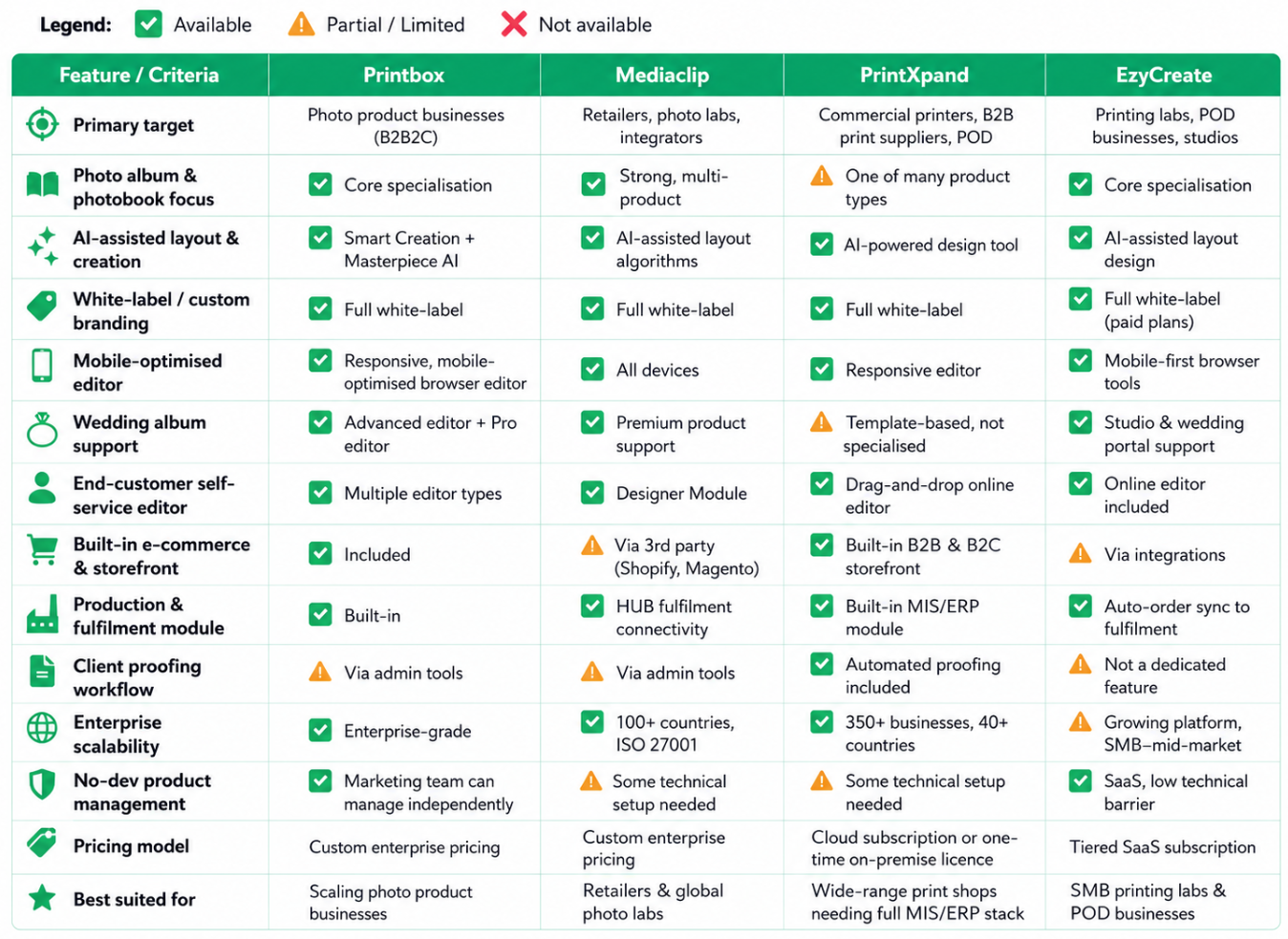
Disclaimer: The data presented in the table above has been compiled based on publicly available information and general research at the time of publication. While we have made every effort to ensure accuracy, some details may have changed since this article was written. If you notice any inaccuracies or would like to suggest a correction, please contact us at info@getprintbox.com.
Key takeaway: There is no one-size-fits-all answer to how to choose photo album software — the right platform depends entirely on your business model. PrintXpand is a strong fit for broad-range print shops that need a full MIS/ERP stack alongside photo products. EzyCreate suits smaller POD businesses looking for a low-barrier SaaS entry point. Mediaclip serves global retailers and photo labs at scale. Printbox stands out for businesses that want to scale a dedicated photo product store with a fully integrated stack — from customer editor to production — under their own brand.
Why Printbox Stands Out as Album Design Software
Printbox is designed as an enterprise-level solution for businesses with ambitious goals. Our philosophy is built on three pillars: flexibility, scalability, and true partnership.
Unlike many out-of-the-box solutions that lock you into a rigid structure, Printbox provides a powerful and flexible photo book album design software platform that allows you to configure a unique user experience tailored to your brand and customers. Our solution is built to handle complexity — enabling you to offer a wide range of products with sophisticated pricing and personalisation options, from standard photobooks to the best wedding album design software experience for professional studios.
We understand that our success is tied to yours. That’s why we act as a strategic partner, not just a software vendor. From a dedicated onboarding team to proactive support, we help you leverage the full power of our photo album software to achieve your business goals. For companies that have outgrown simpler tools and need a scalable, robust platform to power their growth, Printbox is the logical next step.
→ Perhaps you’re still looking for a complete fulfilment solution for personalised print? Take a look at the offer we’ve launched together with our partner, ROQ.
Conclusion
Ultimately, the best photo book album design software is the one that helps your customers finish their projects and helps your business scale without unnecessary friction. When making your choice, look beyond a simple feature list. Analyse how the software solves the core problems of user friction and operational bottlenecks.
A platform that combines a frictionless user experience, smart AI-assisted photo album creation, and a flexible, powerful backend is the one that will deliver the highest return on investment — whether you need a general digital photo album software or a dedicated solution for weddings and professional studios.
Ready to see how truly efficient software for album design can transform your business? Book a Printbox demo to see our platform in action. If you have questions, contact our team for a strategic consultation.

Inga Leder-Majewska
Content & Communication Manager in Printbox. She has over 8 years of experience in expert content creation, communication in social media, and PR. In her spare time, she listens to true crime podcasts and plays with her toddler.


